ENGINEERING NOTES / DEVOPS
Canary Deployment With Istio
Istio service mesh is great for many things ie. Security, Multicluster and hybrid deployment, Circuit breaking, rate limiting, retries, service-to-service authentication/authorization, cluster-wide mTLS, and many more. But this demo will focus on the Canary deployment with Kubernetes Gateway API and Istio.
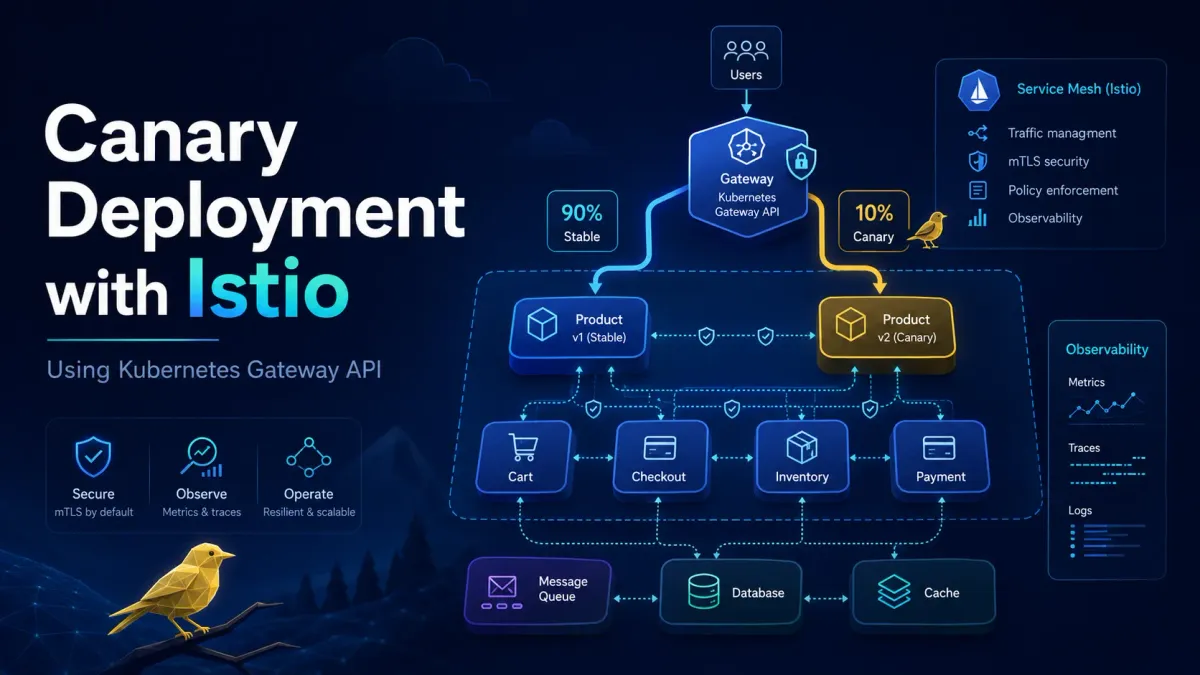
Istio service mesh is great for many things ie. Security, Multicluster and hybrid deployment, Circuit breaking, rate limiting, retries, service-to-service authentication/authorization, cluster-wide mTLS, and many more. But this demo will focus on the Canary deployment with Kubernetes Gateway API and Istio.
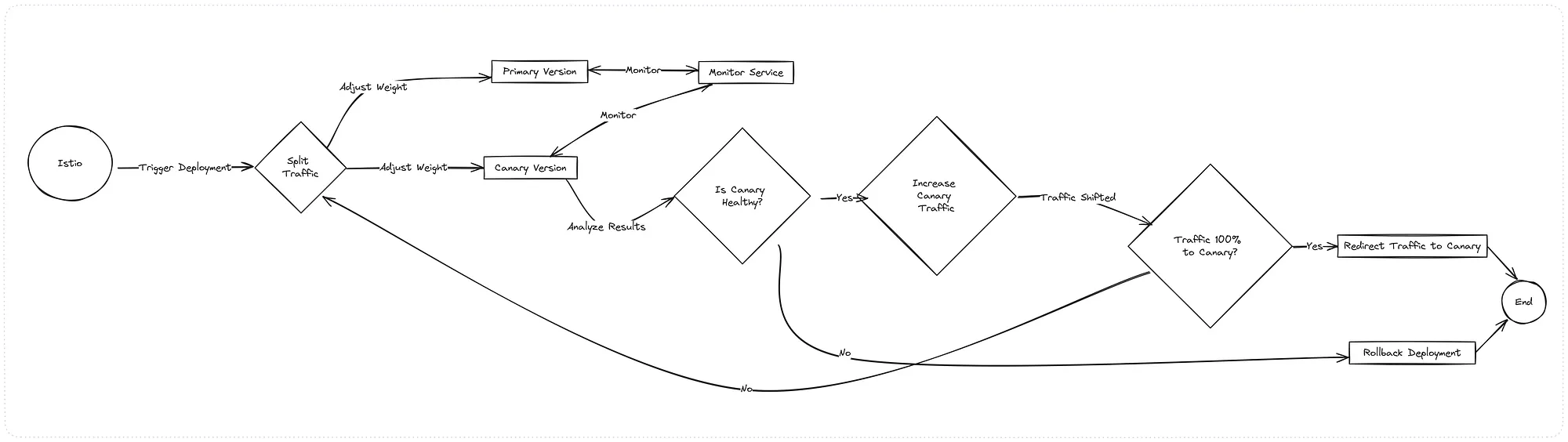
Canary Deployment Flow
Clone The Repo
GitHub - by-sabbir/canary-with-istio: Canary/ Blue-Green Deployment demo with Istio service mesh…
Canary/ Blue-Green Deployment demo with Istio service mesh for kubernetes - GitHub - by-sabbir/canary-with-istio…
Directory Structure
.
├── egcom                   # Helm Chart: full microservice stack
│   └── applications
│       ├── charts
│       └── templates
└── k8s-config              # Backing Services (Mongo ReplicaSet and RMQ)
│    ├── mongodb
│    └── rmq
├── kind-cluster.yaml       # Cluster config
└── metallb-conf.yaml       # BareMetal Load Balancer
System Architecture
The purpose of this demo is to simulate a simple e-commerce event-driven microservice architecture.
Press enter or click to view image in full size
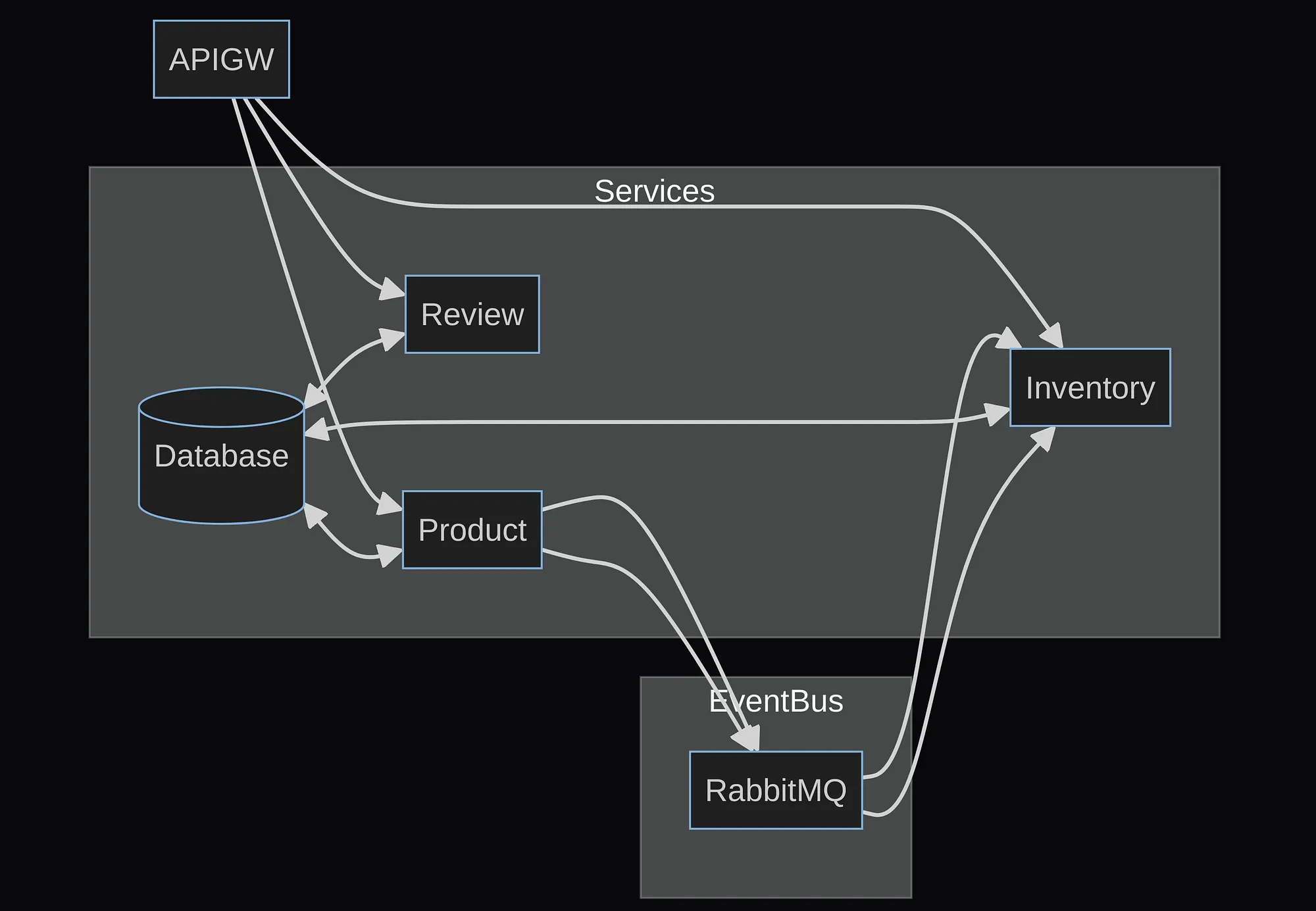
High-Level Diagram for the demo
Kind cluster initiation
If you don’t already have Kind installed, follow the link
kind create cluster --config=kind-cluster.yamlThis will create a kuberntes cluster with 1 control-plane and 2nodes
Install Istio Ingress Gateway CRD
kubectl get crd gateways.gateway.networking.k8s.io &> /dev/null || \
  { kubectl kustomize "github.com/kubernetes-sigs/gateway-api/config/crd?ref=v0.8.0" | kubectl apply -f -; }
Istio Initializing
curl -L https://istio.io/downloadIstio | sh -
# export the istio path
istioctl install --set profile=demo -y
Install and Configure MetalLB
kubectl apply -f https://raw.githubusercontent.com/metallb/metallb/v0.13.7/config/manifests/metallb-native.yaml- Setup address pool for LB
docker network inspect -f '{{ (index .IPAM.Config 0).Gateway }}' kind then configure metallb-conf.yaml accordingly and run k apply
Install RabbitMQ CRDs
kubectl apply -f "https://github.com/rabbitmq/cluster-operator/releases/latest/download/cluster-operator.yml"Configure RMQ
Drop to RabbitMQ Pod shell and run
k exec -it rabbitmq-server-0 -- bashrabbitmqctl add_user admin adminrabbitmqctl set_permissions --vhost / admin '.*' '.*' '.*'rabbitmqctl set_user_tags admin administratorThis will create an admin user Or get the default password from Cli
# Get Username
kubectl get secret rabbitmq-default-user -o jsonpath="{.data.username}" | base64 --decode
# Get Password
kubectl get secret rabbitmq-default-user -o jsonpath="{.data.password}" | base64 --decode
Install Mongo
k apply -f -r k8s-config/mongodConfigure Mongo ReplicaSet
- Drop to Mongo shell
k exec -it mongo-0 -- mongosh
rs.initiate()
var cfg = rs.conf()
cfg.members[0].host="mongo-0.mongo.default.svc.cluster.local:27017"
rs.reconfig(cfg)
rs.add("mongo-1.mongo.default.svc.cluster.local:27017")
rs.add("mongo-2.mongo.default.svc.cluster.local:27017")- Check the replication status
rs.status()
Installing the application via helm
Update egcom/applications/templates/egcom-cm.yaml ConfigMap values with the MongoDB and RMQ creds.
k create ns egcomk label namespace default istio-injection=enabledhelm install egcom ./applications -n egcomRelated: if you run Gateway API instead of Istio virtual services, weighted HTTPRoute backends give you the same traffic split. Berth can set those weights from its UI.
A FRESH PERSPECTIVE ON YOUR CLOUD
Great engineering starts
with a good conversation.
Let’s talk about what’s working, what’s slowing you down, and what comes next.
Talk to an engineer ↗